Best Free Field Service Management Software: Plans, Limits and Features Compared
Six permanently free plans, every limit read from the vendor’s own page on 2 August 2026 — plus five names that appear on almost every free roundup and do not have a free plan at all. We publish who we are and how we verify these figures so you can weigh the comparison for yourself.
Quick answer
There is no single best free field service management software, because the free plans are limited along different axes and your job volume decides which limit bites first. Opsler’s Budding plan is free forever for 2 seats — 1 admin and 1 technician — with 50 jobs per month, the highest monthly job allowance of any plan here that has work orders at all, and the only multi-seat free plan carrying the complete quote-schedule-invoice loop with documented offline work. If you are one person on an iPhone doing under 30 jobs a month, ServiceM8’s free plan is a better fit. If you have ten people and no invoicing to do, Connecteam is. Those are genuine recommendations, not concessions.
- Most jobs a month free
- Opsler Budding — 50 jobs, 2 seats
- Most users on a capped plan
- Zoho FSM — 20 users, 30 appointments
- Only free plan with unlimited users
- Dusk FSM — 25 completed jobs
Who publishes this page. Opsler does, and Opsler is one of the six products reviewed on it. Every product is measured against the same criteria and every external number is linked to the vendor’s own page so you can check it. Plans change without notice — confirm before you commit.
What “Free” Actually Means in Field Service Software
Search results for field service management freeware blur seven different offers into one word. They are not interchangeable, and the difference between them is usually the difference between a tool you keep and a tool you have to migrate off in a fortnight. Here is each model, with an example from this page.
Free forever, usage-limited
$0 with no end date, capped by how much work you put through it — jobs, appointments or completed visits per month. Opsler Budding (50 jobs), ServiceM8 (30 jobs), Dusk FSM (25 completed jobs) and Zoho FSM (30 appointments) all work this way.
Free forever, user-limited
$0 with no end date, capped by headcount. Connecteam's Small Business plan is free for up to 10 users. Opsler caps both: 2 seats and 50 jobs.
Free forever, feature-limited
$0 with no end date, but the parts of the workflow that make money are behind the paywall. Contractor+ FREEDOM allows 5 estimates or invoices a month and puts scheduling on a paid plan.
Free trial
Full access for a fixed number of days, then a bill. Jobber and Housecall Pro run 14 days, Zoho FSM 15, Kickserv 30. Useful for evaluation. It is not a free plan, and articles that mix the two are why this page exists.
Rebate- or transaction-funded
No subscription, paid for by a percentage of the payments you collect or by financing referrals. Read the payment terms before you call it free: a 3% cut of $10,000 a month is $300 a month. Opsler takes 0% — it is not a payment processor, so your money never passes through it.
Open source
The licence is free; the running of it is not. You supply the server, the upgrades, the backups and the security patching. Genuinely the right answer for teams that need to own and modify the code — covered properly in the guide linked below.
Build your own
A low-code or spreadsheet build on a free tier. Cheapest to start, most expensive to maintain, and the person who built it becomes a dependency. Fine for a single form; painful as a dispatch system.
Free download
Mostly a phrase left over from installed software. Modern field tools install from the browser onto the home screen instead, with no app-store approval and nothing to patch on a server.
Only the first three models are compared in the table below, because only those three let you run a service business at $0 indefinitely. Open source and build-your-own are a different decision with a different cost structure — the trade-offs are set out in the open-source FSM guide.
How We Evaluated Free FSM Products
A product qualified for this list of the best free field service management software if the vendor publishes a plan that costs $0 with no expiry date. Free trials were excluded and are listed separately. Every number came from the vendor’s own pricing, plan or help page — never from a review site, an affiliate roundup or another comparison article — and where a vendor does not state something, the table says “Not published” rather than guessing.
The nine things we checked on every plan, and that you should check yourself
Is it a plan or a countdown?
Published $0 tier with no end date. Trials excluded.
Seats, and their composition
Not just how many people, but which roles. 2 seats meaning 1 admin + 1 technician is a different product from 2 unrestricted seats.
Monthly job or appointment cap
The number that usually forces the upgrade. Check whether it counts created or completed jobs.
Customer, inventory and storage records
Unlimited customers does not imply unlimited anything else. Inventory items, locations and storage are capped separately.
Free field service scheduling software, or just a calendar
Whether the free tier includes real dispatch — assigning a job to a person for a time slot — or only shift scheduling.
Estimates and invoices
Can you quote and bill for free, and is there a monthly document cap?
Mobile and offline
What the technician can do with no signal, and what the vendor actually documents about it.
Support and data export
What help you get at $0, and whether you can take your records out.
Upgrade trigger and the price of crossing it
Which limit forces payment first, and exactly what the next tier costs.
Checked: 2 August 2026. Sources: Connecteam · Dusk FSM · ServiceM8 · Zoho FSM · Contractor+ · Kickserv · Jobber · Housecall Pro . Opsler figures come from our own published pricing.
Free Field Service Software Compared
Six plans that cost $0 with no expiry date, in order of monthly job allowance. Tap a product name to jump to its review.
| Plan | Free model | Users | Jobs/month | Scheduling and dispatch | Estimates | Invoicing | Offline | Key limit | Upgrade |
|---|---|---|---|---|---|---|---|---|---|
| Opsler Budding(this site) | Free forever, seat- and usage-limited | 2 seats — 1 admin + 1 technician | 50 jobs per month | Yes | Yes | Yes | Yes | 100 inventory items in 1 inventory location; 21 of the 42 features | Pro at $25 per seat per month, no seat minimum |
| Connecteam Small Business | Free forever, user-limited | Up to 10 users | No job cap — there is no work-order record to cap | Partial | No | No | No | No estimates, invoices or work orders in any hub | Paid hubs once you pass 10 users |
| Dusk FSM Launch | Free forever, usage-limited | Unlimited staff and contractors | 25 completed jobs per month | Yes | Not published | Yes | Not published | 25 completed jobs per month, shared across the whole team | Paid tier — the free plan does not bill overages, it stops |
| ServiceM8 Free | Free forever, usage- and user-limited | 1 user | 30 jobs per month | Yes | Yes | Yes | Yes | One user only; SMS billed at 10c each on the free plan | Starter at $29 per month, which raises the cap to 50 jobs |
| Zoho FSM Free edition | Free forever, usage-limited | Up to 20 users | 30 appointments per month | Yes | Yes | Yes | Not published | 30 appointments per month shared across up to 20 users | Appointment-volume tiers, from 60 up to 50,000 appointments a month |
| Contractor+ FREEDOM | Free forever, feature- and usage-limited | Not published | No job cap — 5 estimates or invoices per month combined | No | Partial | Partial | Not published | Up to 250 leads and clients; 5 estimates or invoices per month | PRO at $29 per month for 1 user; PRO TEAM at $58 per month for the first 2 users |
Checked 2 August 2026. Partial = the capability exists but is capped or reduced on the free tier. Not published = the vendor does not state it either way, so we are not asserting it.
Widely listed as free — and not free
These names turn up on most free-FSM roundups. On 2 August 2026 none of them published a free plan. A clear no is worth as much to you as a yes.
Kickserv
No free plan. Start is $60 per month for 5 users, Run $119 for 10 and Scale $199 for 20, with 20% off annual. Every tier offers a 30-day free trial, which is where the confusion comes from.
Vendor pricing pageJobber
No free plan. Prices come from a team-size band — at 2-5 people on monthly billing the cheapest plan, Connect, is $199 a month. The trial is 14 days with full Grow access and no credit card.
Vendor pricing pageHousecall Pro
No free plan. A Teams/Individual control above the plans re-prices all of them: Individual is Basic $79, Essentials $229 and Max $349 a month, one user each; Teams is Essentials $299 for 5 users and Max $649 for 8. The trial is 14 days, no credit card. No additional-seat price is published.
Vendor pricing pageWorkiz
A free Lite tier is widely reported by third-party sites. Workiz does not publish one, and we do not list a plan we cannot read on the vendor's own page. Ask Workiz directly before planning around it.
Vendor pricing pageServiceTitan, FieldEdge, simPRO, FieldPulse
No free plan and no published pricing. Each is quote-led, so the cost of the paid tier is not knowable without a sales conversation.
Opsler Free Plan
Publisher disclosure: Opsler operates this website.
Budding is Opsler’s permanently free plan. It is not a trial, it does not expire and it does not ask for a card. Here is every limit on it, published in full, because the point of a free plan is that you can tell in advance whether it fits.
Every Budding limit
- Price
- $0, forever. No credit card.
- Seats
- 2 — 1 admin and 1 technician
- Jobs
- 50 per month
- Customers
- Unlimited
- Inventory
- 100 items in 1 inventory location
- Features
- 21 of Opsler's 42 features
- Platform fee on payments
- 0% — Opsler is not a payment processor
- Pro trial
- 14 days, no credit card
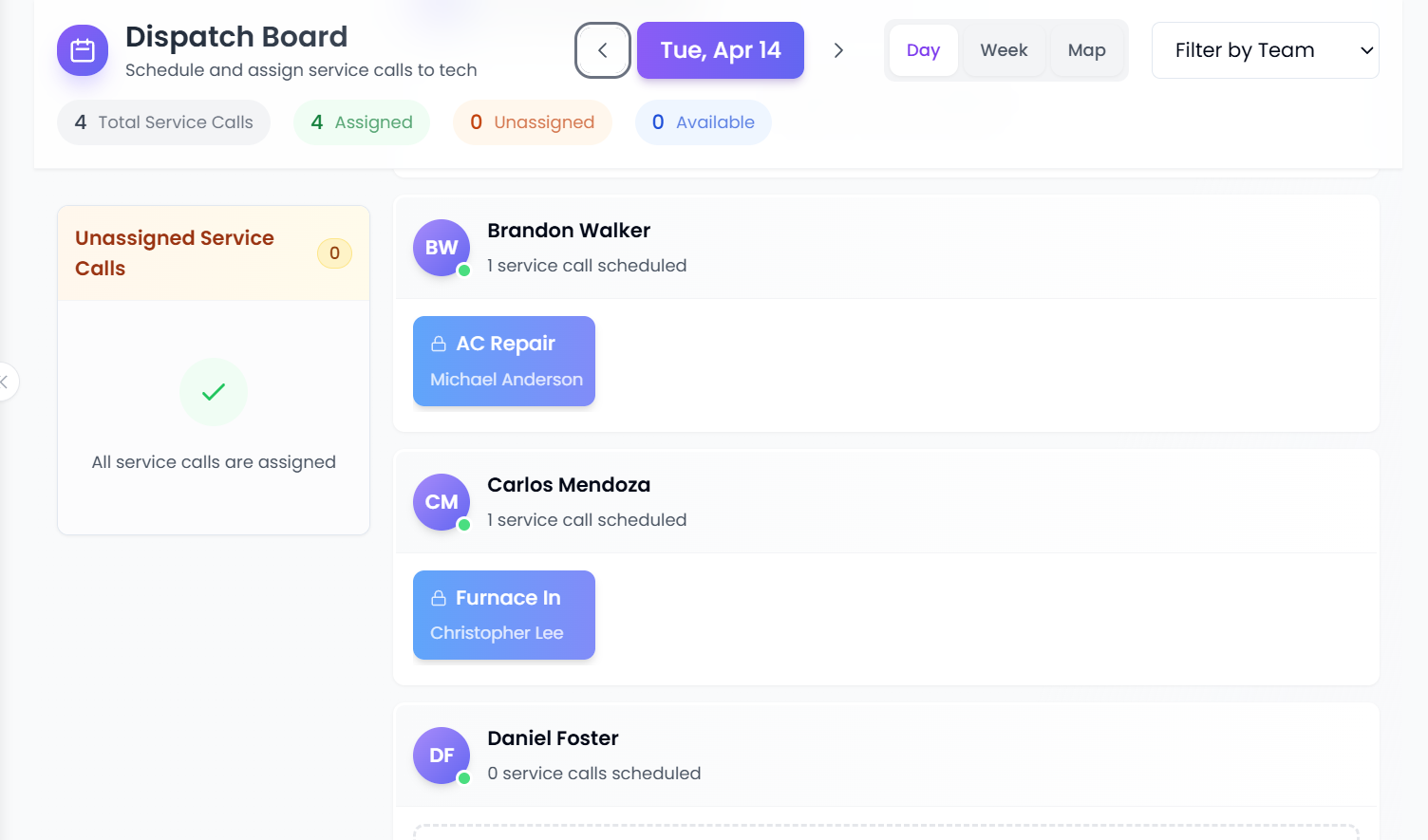
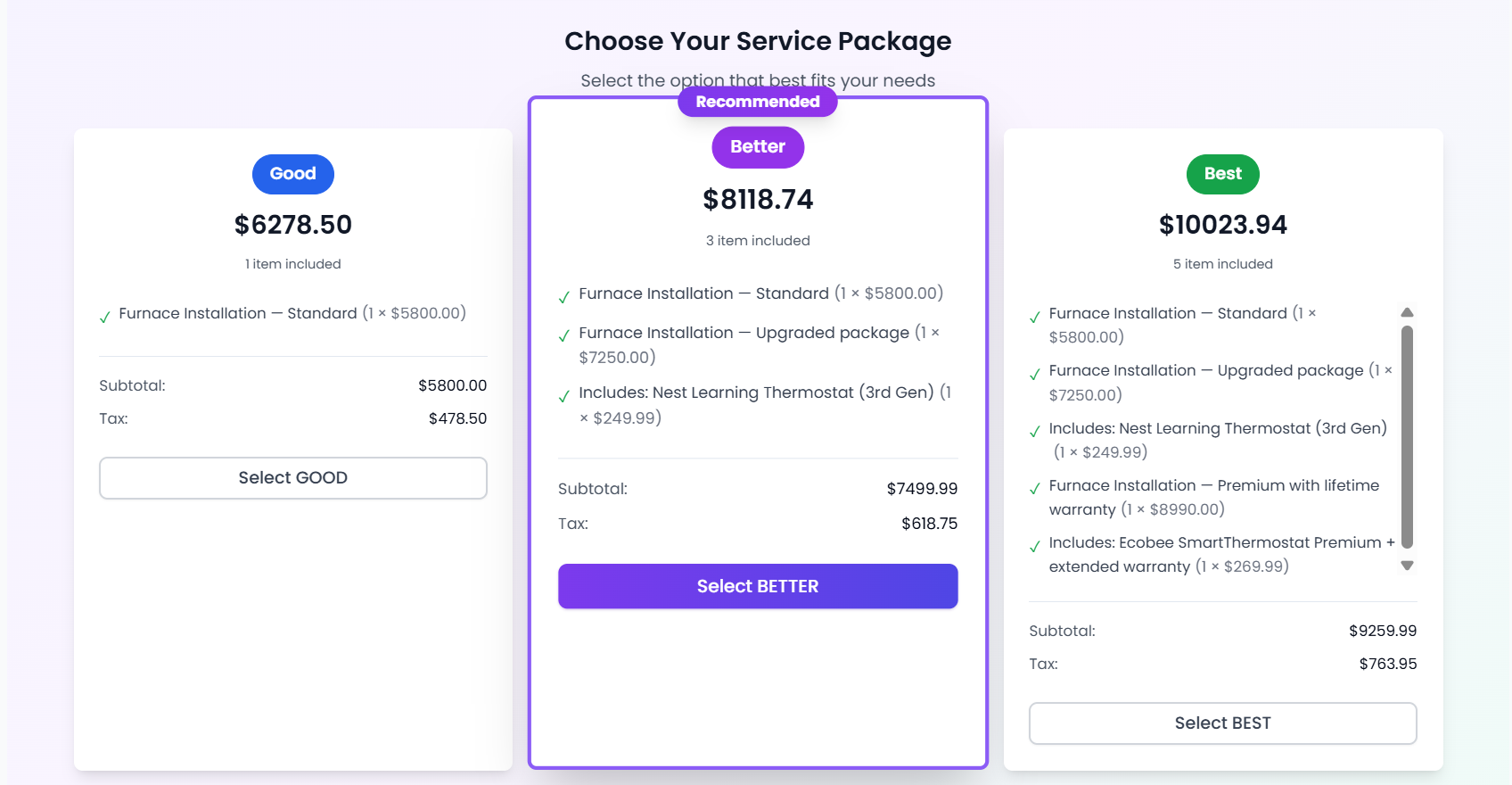
The workflow included at $0
Best fit
A two-person shop — one person in the office, one in the van — that needs the full job-to-invoice loop and works in basements, roof spaces and rural properties where signal drops.
A useful sanity check: 50 jobs a month is roughly two to three jobs a day, five days a week, for one technician. Appliance repair and pest control routes usually sit inside that. Busy HVAC in July usually does not.
What Pro adds when you outgrow free
Recurring maintenance series, warranty tracking, GPS on jobs, technician timers, route optimisation and multi-location inventory all come with Pro at $25 a seat. If you run maintenance contracts, that is the plan you want.
Two more worth knowing before you start. The QuickBooks- and Xero-formatted CSV exports come with Pro, and they are files you download and import on your own schedule rather than a live sync — nothing to authorise, nothing to re-link when a password changes. And customer contact runs on email carrying the no-login portal link, at no per-message cost, so a busy month never arrives with a messaging bill attached to it.
Connecteam
Small Business plan · Free forever, user-limited · checked 2 August 2026 against connecteam.com/pricing
- Users
- Up to 10 users
- Jobs
- No job cap — there is no work-order record to cap
- Key limit
- No estimates, invoices or work orders in any hub
- Upgrade
- Paid hubs once you pass 10 users
Best fit
A cleaning, security or landscaping crew of up to ten where the problem is shift coverage, clock-ins and getting a message to everyone — not quoting and billing.
The real drawback
It is workforce management, not field service management, and Connecteam's own help centre states the app cannot be used offline at all.
Connecteam is the most generous free plan on this page by headcount and the most honest about what it is: an operations, communications and HR product. All three hubs and all features are free for up to 10 users. There is no work order, no estimate and no invoice, so if you use it as your only system you will still be quoting and billing somewhere else. Its help centre also states plainly that the app cannot be used offline from mobile, kiosk or desktop, which rules it out for basements, plant rooms and rural call-outs.
Dusk FSM
Launch plan · Free forever, usage-limited · checked 2 August 2026 against duskmobile.com free plan
- Users
- Unlimited staff and contractors
- Jobs
- 25 completed jobs per month
- Key limit
- 25 completed jobs per month, shared across the whole team
- Upgrade
- Paid tier — the free plan does not bill overages, it stops
Best fit
A larger crew with a small number of high-value jobs, or a subcontractor network where you need everyone in the system but only complete a couple of dozen jobs a month.
The real drawback
25 completed jobs is the lowest cap of any plan here, and unlimited users makes it easy to hit. Offline behaviour is not published on the free-plan page.
Dusk FSM publishes its free limit as clearly as anyone: free for up to 25 completed jobs per month, no credit card, not a time-limited trial, and no overage billing — you upgrade rather than get charged. Scheduling and dispatch, mobile apps for iOS and Android, digital forms, time tracking and invoicing are all in. The catch is arithmetic: unlimited staff sharing 25 completed jobs is a low ceiling for anyone with a full crew.
ServiceM8
Free plan · Free forever, usage- and user-limited · checked 2 August 2026 against servicem8.com/pricing
- Users
- 1 user
- Jobs
- 30 jobs per month
- Key limit
- One user only; SMS billed at 10c each on the free plan
- Upgrade
- Starter at $29 per month, which raises the cap to 50 jobs
Best fit
A genuine one-person business on Apple hardware doing about a job a day, who wants quoting and invoicing from the phone and nothing else.
The real drawback
Adding a second person means leaving the free plan immediately, and the full-featured app is iPhone and iPad — the Android build is described by ServiceM8 as a Lite app for subcontractors and temporary workers.
ServiceM8’s free plan is the closest thing on this page to a complete solo-operator product: create jobs, send quotes and invoices, manage clients and the schedule, at $0 for 30 jobs a month. Offline is documented and real — field staff can access and update job details, take photos and capture signatures with no connection, with templates and outbound email or text as the stated exceptions. Two things to weigh: it is one user, so a second person means paying; and the full app is built for iPhone and iPad, with ServiceM8 describing the Android build as a Lite app for subcontractors and temporary workers. SMS is billed at 10c each on the free tier.
Zoho FSM
Free edition plan · Free forever, usage-limited · checked 2 August 2026 against zoho.com/fsm/pricing
- Users
- Up to 20 users
- Jobs
- 30 appointments per month
- Key limit
- 30 appointments per month shared across up to 20 users
- Upgrade
- Appointment-volume tiers, from 60 up to 50,000 appointments a month
Best fit
A team already inside the Zoho ecosystem that wants requests, work orders, a dispatch console, estimates and invoicing without adding a second vendor.
The real drawback
Thirty appointments a month across twenty people is roughly one and a half jobs per person, and pricing is by appointment volume rather than seats, so the cost curve is hard to predict from the free tier.
Zoho FSM’s free edition is the broadest free feature set here: requests, estimates, work orders, services and parts, customer management, a dispatch console, service reports, invoicing and payments, users and equipment, standard reports, the mobile app, workflow automation and REST APIs — for up to 20 users. The constraint is 30 appointments a month, and Zoho’s paid pricing is sold by appointment volume rather than by seat, so model your monthly job count before you commit. There is also a separate 15-day trial with no credit card, which is a different offer from the free edition.
Contractor+
FREEDOM plan · Free forever, feature- and usage-limited · checked 2 August 2026 against contractorplus.app/pricing
- Users
- Not published
- Jobs
- No job cap — 5 estimates or invoices per month combined
- Key limit
- Up to 250 leads and clients; 5 estimates or invoices per month
- Upgrade
- PRO at $29 per month for 1 user; PRO TEAM at $58 per month for the first 2 users
Best fit
A contractor who mainly needs a client list and the occasional quote, and is happy to schedule out of a phone calendar.
The real drawback
Scheduling, contracts, payment processing and unlimited estimates and invoices are all behind a paid plan, so five documents a month is the real ceiling.
Contractor+ FREEDOM is the clearest example of feature-limited free contractor software: $0, basic CRM, up to 250 leads and clients, on web, mobile and tablet — and up to 5 estimates or invoices per month combined. Scheduling, contracts, payment processing and unlimited documents are on the paid tiers, with PRO at $29 a month for one user and PRO TEAM at $58 a month for the first two. For a contractor sending a handful of quotes a month it is genuinely usable. For a dispatching business it is a CRM, not a field service system.
Free Plan vs Free Trial vs Open Source
These three are the models buyers most often confuse, and they differ on who owns the software, who runs the servers, who fixes it at 7am and what happens to your data when you leave. The matrix below is the short version.
| Permanently free plan | Free trial | Open source | |
|---|---|---|---|
| What it costs | $0 indefinitely, inside published limits | $0 for 14–30 days, then the list price: Jobber from $49/mo solo (Connect at $199 once you hire), Housecall Pro from $79/mo for one user, Kickserv from $60/mo for five | $0 licence, plus hosting, and your own time |
| Who owns the software | The vendor. You licence access. | The vendor. You licence access. | You hold a licence to the source and can modify it |
| Who hosts and maintains it | The vendor | The vendor | You — server, upgrades, backups, security patching |
| Support | Usually limited on free tiers; Opsler reserves priority support and done-for-you assistance for paid plans | Usually full support during the trial window | Community forums, unless you pay for commercial support |
| Your data | Check the export path before you start. Opsler Budding exports customers and invoice or payment records to CSV. | Export before the clock runs out, or you lose access to it | It is on your server. Backing it up is your responsibility. |
| What forces a change | Crossing a published limit — seats, jobs or documents | The calendar | Nothing, until an upgrade breaks something |
| Who it suits | Small teams that want to start today and pay only when they grow | Teams evaluating a specific paid product | Technical teams that must own, host or modify the code |
Open source field service management software is a real category with real products, and it is the right answer if you need to read, change or self-host the code. Opsler is not open source: it is a hosted platform and the source is not published. If you are weighing licence freedom against maintenance burden, the comparison of free versus open-source FSM works through both sides properly rather than in a paragraph — one of the longer-form pieces in the buying guides library.
There is a third route worth knowing about if a free plan will not stretch far enough but a monthly subscription is the thing you are trying to avoid: the lifetime deal covers five seats for a single payment, which suits an established small crew with no appetite for another recurring bill.
Which Free Option Fits Your Team?
Free FSM for small business is not one decision, it is six. Find the row that describes you.
If this is you
Solo operator, under 30 jobs a month, iPhone
Start with
ServiceM8 free plan
One user, 30 jobs, quoting and invoicing from the phone, documented offline access. The single-user cap costs you nothing until you hire.
If this is you
Solo operator on Android, or expecting to hire this year
Start with
Opsler Budding
Two seats are already there when the first technician starts, the app installs from any supported browser, and 50 jobs gives you more room than any other free plan here.
If this is you
Office plus one technician
Start with
Opsler Budding
The seat composition is exactly this shape — 1 admin and 1 technician — and the whole loop from dispatch through signed estimate to approved invoice runs at $0.
If this is you
Workforce coordination only — no quoting, no billing
Start with
Connecteam Small Business
Free for up to 10 users with all hubs. Accept that you will invoice elsewhere, and that the app needs a connection.
If this is you
A big crew doing a small number of jobs
Start with
Dusk FSM Launch
Unlimited staff and contractors on the free tier, capped at 25 completed jobs a month. The only free plan here that does not charge you for headcount.
If this is you
You need to own or self-host the code
Start with
An open-source project, not any product on this page
None of these six is open source, Opsler included. If licence freedom is the requirement, start from the open-source guide rather than a free SaaS tier.
What 50 free jobs a month looks like in your trade
HVAC
Attic and crawl-space work is where a connection disappears. Budding's offline sync covers it, but a summer of AC call-outs will pass 50 jobs — plan for Pro before June.
Plumbing
Getting a Good-Better-Best estimate approved and signed before the wrench comes out is the margin protection. Both estimate types are on the free plan.
Electrical
Commercial basements and new-build sites are dead zones. Offline job updates, photos and draft invoices all queue and sync on return.
Pest control
Recurring treatment schedules are a Pro feature, not a Budding one. If your book is mostly contracts rather than one-off calls, price Pro from the start.
Appliance repair
Two to three short jobs a day for one technician lands inside 50 a month. This is the trade the free plan fits most comfortably.
Cleaning
If the job is crew coordination rather than quoting, Connecteam's free 10 users may serve you better than any FSM free tier — including this one.
What Happens When You Outgrow a Free Plan?
Most people searching field service management software free are not trying to avoid paying forever — they are trying to avoid paying before the business can carry it. So the question that matters is not what the free plan includes, it is what leaving it costs and whether your records come with you.
What triggers the Opsler upgrade
Adding a third person, or passing 50 jobs in a month. Those are the only two triggers. Pro is $25 per seat per month with no seat minimum, so a three-person shop pays for three seats and not a five-seat bundle.
If you choose not to upgrade
Your account stays on Budding with its 2-seat and 50-job limits. Customers, jobs, estimates, invoices and inventory records stay where they are. Nothing is deleted for declining to pay.
Getting your data out
On Budding you can export the customer list to CSV. The accounting export screen — QuickBooks-formatted, Xero-formatted and generic alike — is Pro, so invoice and payment history cannot leave the free plan as an accounting file. On Pro it produces a file for manual import; it is not a sync or a live connection.
What Pro adds beyond the caps
Recurring maintenance series, warranty tracking, GPS on jobs, technician timers, route optimisation so the day comes back in the order that drives least, multi-location inventory across warehouses, trucks and vans, inventory audit logs, office-staff roles, bulk team import, per-technician efficiency reporting, and the accounting-formatted exports. There is a 14-day trial with no credit card if you want to see them first.
The lifetime option
A one-time $499 covers 5 lifetime seats with future features included. Additional seats beyond those five are $25 per seat per month, so it is not an unlimited-seat account.
Ask every vendor these before you start
Can I export everything, and in what format? Has this free plan's limits changed in the last year? Is any percentage taken from payments I collect? What exactly do I lose the day a trial ends? Any vendor that will not answer in writing is answering.
Free FSM FAQs
The free field service management software FAQ we are asked most often, answered with the actual numbers.
It depends on your job volume, not your headcount. Two people running 30 to 40 jobs a month fit inside Opsler's Budding plan — 2 seats, 1 admin and 1 technician, with 50 jobs per month — and can quote, schedule, invoice and collect without paying anything. Two people running 80 jobs a month do not, and neither ServiceM8's 30-job free plan nor Dusk FSM's 25-completed-job free plan will hold them either. Count your jobs from last month before you choose. If the number is above 50, you are choosing a paid plan and the honest question is which one.
Yes. Budding has no time limit and needs no credit card. It is 2 seats — 1 admin and 1 technician — with 50 jobs per month, unlimited customers, 100 inventory items in 1 inventory location. If your business never outgrows those numbers, you never pay. It is a plan, not a countdown, and it is not a trial in disguise.
You move to Pro at $25 per seat per month with no seat minimum, which lifts the job cap and the inventory limits. Nothing is deleted if you stay on Budding instead — your customers, jobs, estimates and invoices remain, and you carry on inside the free limits. There is also a 14-day Pro trial with no credit card if you want to see the paid features before deciding.
Opsler Budding includes the dispatch board. Dusk FSM's free Launch plan includes scheduling and dispatch. ServiceM8's free plan includes the schedule. Zoho FSM's free edition includes the dispatch console. Connecteam has shift scheduling rather than job dispatch, because it has no work-order record. Contractor+ puts scheduling behind a paid plan. Route optimisation, as distinct from dispatch, is a Pro feature in Opsler and is not on Budding.
No, and the difference is the whole point of this page. A trial is full access for a fixed number of days, after which you pay or lose access. Jobber and Housecall Pro run 14-day trials, Kickserv runs 30 days and Zoho FSM runs 15 days. When the clock stops you are choosing a plan: Jobber's cheapest is Core at $49 a month, and that band exists only while you are the only user — hire one person and Core is withdrawn, so the entry price becomes Connect at $199. Housecall Pro's cheapest is Basic at $79 a month for one user. Kickserv starts at $60 for five. A free plan has no end date and limits you by seats, jobs or features instead. Opsler runs both: Budding is the free plan and it does not expire, and there is a separate 14-day Pro trial with no credit card.
Not in the sense the phrase implies. There is no app-store listing to download Opsler from. You open Opsler in a supported browser on desktop, Android or iPhone and install it to the home screen from there, with no store approval needed. Downloadable, self-hosted field service software does still exist as open-source projects, but you take on the server, the backups and the upgrades along with the license.
Yes, and not as a read-only cache. Opsler is a free field service app that installs straight from a browser, with a Sync for Offline screen that downloads the day's jobs, the parts catalogue, the service catalogue, tax presets, van stock levels and customer history before the technician leaves signal. With no signal at all they can start, pause and complete jobs, tick the checklist, write up the work, take before-and-after photos, capture a signature, raise the invoice and record the payment; all of it queues and syncs itself when connectivity returns. That is on the free plan, not an upgrade. Among the other free plans here, ServiceM8 also documents offline job access. Connecteam's help centre states its app cannot be used offline. Dusk FSM, Zoho FSM and Contractor+ do not publish an offline statement either way.
On Opsler Budding you can export your customer list to CSV. Accounting export is Pro end to end — the invoice and payment export screen is gated, so the free plan cannot produce a QuickBooks-formatted, Xero-formatted or generic accounting file. When you do reach it on Pro, it produces a file for manual import rather than a live sync or connection. Ask every vendor on your shortlist the same question before you put a year of job history into their free tier.
No. Opsler is a hosted platform and the source is not published, so if you need to read, modify or self-host the code, an open-source project is the right category and Opsler is not. What Budding gives you instead is the zero cost without the server, the patching or the backup rota. If that trade-off is the decision you are making, the separate open-source guide sets both sides out properly.
Two seats, 50 jobs a month, no credit card and no expiry date. If it fits, it is free for as long as it fits.
Start Opsler free — 2 seats and 50 jobs/monthOpsler pricing
Free, Pro at $25/seat/month, lifetime $499
Work order management
The full work order lifecycle, included on Budding
Offline technician app
What a technician can do with no signal
Install Opsler on any device
Installing from the browser, with no app store
Open source vs free FSM
Licence freedom against maintenance burden
Industries and trade presets
HVAC, plumbing, electrical, pest control and more
External plan details checked 2 August 2026 against each vendor’s own page and dated on purpose — free plans change quietly. Verify before you commit.
Ready to Run Your Business Without the Chaos?
Scheduling, dispatch, estimates, invoicing, customer portal, and a free branded website — start completely free, upgrade to Pro when you scale.
Free forever on the Budding plan. No credit card required.