Service Technician Scheduling Software for Faster Dispatch
Most shops lose the day between 7am and 9am. The whiteboard says one thing, the shared calendar says another, and two technicians are booked at the same address before anybody notices. Opsler is service technician scheduling software that collapses that into one board: unassigned work on the left, every technician on the right, and one action that puts a job on somebody’s phone.
The dispatcher still decides. The software makes acting on that decision instant, and makes it hard to get silently wrong.
Quick answer
Opsler is technician scheduling software for small field service teams — two people or thirty, in HVAC, plumbing, electrical, appliance repair and the rest. The dispatch board is used by the owner or whoever answers the phone. It schedules and dispatches customer jobs and work orders, one date at a time, to named technicians.
What the board does
- Queues every unassigned job, ordered by priority then age
- Shows one row per technician with their day in time order
- Assigns by drag-and-drop, or one click from a shortlist of available people
- Checks for a schedule clash on every assignment, server-side
- Pushes the assignment to the technician's app and refreshes their job list
- Switches between Day, Week and Map, and filters by team when you have several
What it will not do
- Choose the technician for you — no AI scheduling, no auto-dispatch
- Match on a skill matrix, a certification list or a GPS position
- Re-sequence a day on its own; route optimisation is a Pro action you trigger
- Hold a job that spans more than one calendar day as a single record
- Send the customer an SMS — email and the portal link, not text messages
The dispatch board is included on the free Budding plan. Map view, route optimisation and recurring series are Pro.
Scheduling vs dispatch vs route optimization
Field service dispatch software is sold as one product and is really three jobs. They get bundled, they get priced together, and buyers end up paying for automation they switch off in month two because they were short of a different thing entirely. Worth ten seconds to work out which one you actually lack.
Scheduling
Deciding who does the job and when. In Opsler that is the job record's date, its fixed time or flexible all-day window, and the technician on it.
Dispatch
Getting that decision to the person. Assignment pushes to the technician's app and refreshes their job list; the office does not phone to confirm.
Route optimisation
Re-sequencing an already-assigned day to cut driving. A separate, deliberate action on Pro — not something running quietly in the background.
If the driving is the problem rather than the assigning, read the route optimization page instead — the rest of this one is about the first two.
See the day on one live board
The dispatch board is a two-column screen, and that is the whole idea. Nothing is hidden behind a filter you have to remember to clear.
The queue, left
Every job with nobody on it, with a count badge on the header. Each card shows the last six of the job number, the service type, the customer, the priority badge, the time if one is set, and the start of the address. A lock icon means a fixed appointment; a shuffle icon means a flexible window that route optimisation is allowed to move.
The technicians, right
One card per assignable technician: initials, a coloured availability dot, their name, how many jobs they are holding that day, and their specialization as a badge. Assigned work sits in the row as chips in time order, coloured by priority, each showing the time, the service and the customer.
The numbers, on top
Four counts that tell you whether the day is under control: total jobs, assigned, unassigned, and how many technicians are currently available.
The controls
Back a day, forward a day, a button that snaps to today, and a Day / Week / Map toggle. Week runs from the day you are on to the coming Sunday. A team filter appears only if you have more than one team, so single-crew shops never see it.
Create and assign jobs/work orders
Field technician scheduling software earns nothing until a job exists, and the job starts before the board. It arrives from a phone call, an online booking, or an estimate the customer just approved. It carries the customer and site address, a service from the pricebook, a date, a fixed time or a flexible all-day window, a duration, a priority of low, medium or high, and a checklist if the service has one attached.
- 1Create the job with the customer, service, date and time window. Leave the technician blank if you do not know yet.
- 2It lands in the unassigned queue, sorted above lower-priority work and above anything created after it.
- 3Assign it: drag the card onto a technician, or use the plus button for a one-click pick.
- 4The job status moves to Assigned, that technician's job count updates, and the assignment is written to the activity log.
- 5A push notification reaches the technician and their job list refreshes on its own.
Drag, drop, reassign and reschedule
Drag and drop scheduling here is deliberately coarse, and it is worth knowing why before you evaluate it against a screenshot. The drop target is a technician, not a pixel on a timeline. Pick up a card, the target row outlines in violet and says drop to assign, let go, done.
Assign
Drag from the queue onto a technician. The card leaves the queue and appears as a chip in their row, positioned by its scheduled time.
Reassign
Drag a chip from one technician's row to another. The old technician is notified that the job moved and who now has it; the new one gets the assignment push.
Reschedule
Change the date or time on the job record. The board redraws, the technician is pushed the change, and the customer is emailed if the date moved.
Two honest limits. Dropping a card does not change the job’s time — times are set on the job, where the fixed-versus-flexible choice also lives. And there is no drag back to the queue to unassign; that happens on the job record. Both of those are things a demo video can make look otherwise, so check them on your own trial.
Nothing is silently overwritten. Every assignment is logged with the job, the technician and the time, and the technician-side notification history keeps its own record of what landed and when.
Availability and technician status
Most scheduling software for field technicians shows you a calendar and leaves you to infer who is free. Technician availability here is a coloured dot on the avatar, and it is the one signal that changes who Opsler will offer you. Quick Assign only lists people currently marked available — you can still drag a job onto anyone, but the one-click path will not hand work to somebody who is out.
Available
Free to take work. These are the names Quick Assign offers.
On job
Currently working. Visible on the board, not offered by Quick Assign.
Unavailable
Off, on leave, or not taking work today.
A technician’s specialization shows as a badge on their row, so a dispatcher can see at a glance who the gas engineer is. It is information for the human, not a filter the software applies — Opsler will let you assign a job to anyone, because it does not know that today the qualified person is two hours away and the customer asked for someone by name.
See live technician tracking
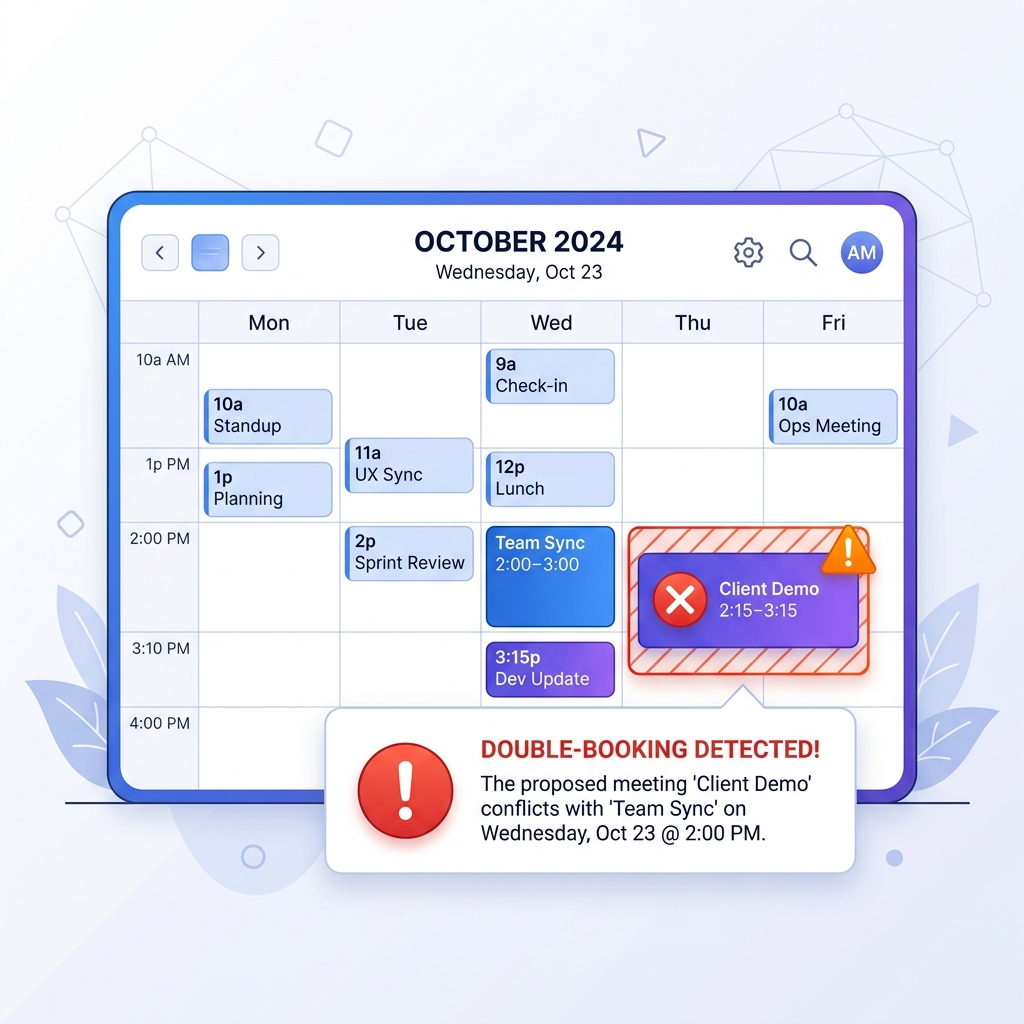
Conflict detection
Scheduling conflict detection is not a colour on a calendar here. It runs on the server, on every single assignment, comparing the job you are placing against every other job that technician holds on that date — skipping anything already completed or cancelled, because those are not clashes.
EXACT_TIME
Start and end match the existing job exactly. Treated as critical.
TIME_RANGE
The windows overlap by any amount. Also treated as critical.
SAME_DAY
One of the two jobs has no times, so only the date can be compared. A notice, not an alarm.
When a clash is found, the assignment is allowed through and the technician is notified — the alert names the job being added and the job it collides with, and an exact or overlapping clash is flagged as requiring interaction so it cannot be swiped away on a lock screen. The office dashboard refreshes on the same signal.
Being straight about the shape of this: today the clash is detected and pushed rather than blocked with a modal on the board. Resolution is manual — reassign, or move a time, because a same-day double-booking is sometimes exactly what you meant to do.
Map and route context
The service dispatch map is the third view on the board toggle, and it is a Pro view. Set expectations correctly: it is a map centred on the day’s work with the optimisation control sitting on top of it. It does not drop a numbered pin per stop, it does not show where each technician is right now, and it does not draw the optimised route as a line across the city.

What the optimiser actually does
It splits a technician’s day into fixed appointments and flexible ones, sends the flexible stops to the Google Directions API, and comes back with a proposed order. You need at least two flexible jobs with usable coordinates or it tells you there is nothing to optimise.
You approve it, or you do not
The proposal shows the miles and the minutes it would save, with Cancel next to Save. Decline a re-order that looks efficient and ignores something you know about the customer. Fixed appointments are never moved; only flexible jobs get new times written.
Route optimisation requires Pro ($25 per seat per month). Full detail on the route optimization page.
Urgent jobs, cancellations and changes
No schedule survives a Tuesday. Emergency dispatch in a small shop is not a special module — it is the same board, used faster, four times before lunch.
A no-heat call at 10:40
Create the job at high priority. Priority ordering floats it to the top of the unassigned queue, above the booked filter changes. Hit the plus button on the card and pick from the technicians currently showing as available.
A technician calls in sick
Open each job in their row and reassign it, or drag the chip onto another technician's card. The previous technician is notified that the job moved, and told who has it now — so nobody drives to a job that is no longer theirs.
The customer moves to Thursday
Change the date on the job. The customer is emailed the old date and the new one, and the assigned technician is pushed the change. If the technician is the one rescheduling from the field, they pick a reason code as they do it.
A job runs long
The board will not resequence the rest of the day for you. What it gives you is a live view of who is still On Site and who is already available, so the reshuffle takes one drag rather than four calls.
One note on priority, because competitor pages inflate this. A job is set to low, medium or high. There is no separate emergency tier to configure; high is the top, and high work sorts to the head of the unassigned queue with older jobs ahead of newer ones at the same level.
Recurring and multi-day work
Recurring scheduling (Pro)
A maintenance series repeats daily, weekly, monthly or yearly with an interval — every two weeks, every third month — on chosen weekdays or a set day of the month. It ends never, after a number of visits, or on a date, and can be paused and resumed without being rebuilt.
Each occurrence is stamped from a template holding the technician, the start and end time, the duration, the priority, the service and its checklist, and the labor and parts charges. Visits appear on the dispatch board as ordinary jobs, and generation is idempotent — a date that already has its visit will not get a second one.
See recurring maintenance contractsMulti-day work: not one record
A job carries one scheduled date with a start and an end time. There is no job that spans Monday to Wednesday. A three-day changeout is booked as three jobs against the same customer, which keeps each day’s labor, parts and proof attached to the day it happened — but it is not what a project-scheduling tool would give you, and if you run week-long installs you should weigh that seriously.
Technician mobile/offline loop
Offline field service scheduling is the half of dispatch that quietly decides whether the board is telling you the truth. A technician in a plant room with no bars still has to be able to work, or the office is guessing again by 11am.
- Their Today page lists the day's jobs with address, customer, service and dispatch notes
- Assignments and reassignments arrive as a push and refresh the list without a manual pull
- Sync for Offline caches today's jobs, the parts and service catalogs, tax settings, their van and its stock
- With no signal they can still go On My Way, mark Arrived, pause with a reason, resume and complete
- Queued actions replay when the connection returns, in the order they happened
The app installs from a supported browser on Android, iPhone, laptop or desktop. There is no App Store or Google Play download to chase.
See the offline technician workflow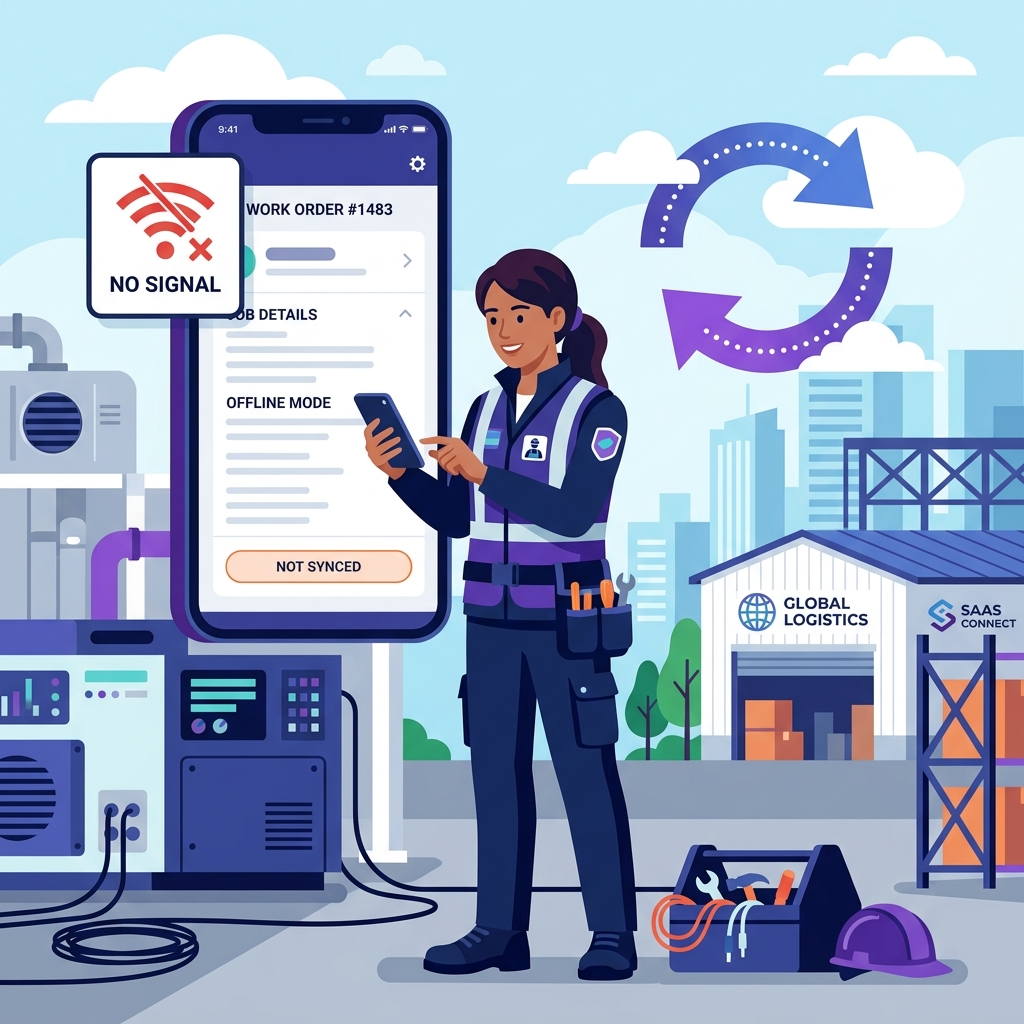
Customer ETA and notifications
The customer ETA comes from the technician, not from an algorithm guessing traffic. When they tap On My Way, a short prompt appears pre-filled with thirty minutes from now — they adjust it, or skip it. That single number is what the customer sees, which is why it is usually right.
The on-my-way email
Sent to the customer's email on file, naming the technician and carrying the ETA. A second email goes out when they arrive.
The no-login portal link
Status banner reading scheduled, on the way, arrived, in progress or completed, plus the date, the time window, the address and the ETA while the visit is live.
Live tracking while en route
Going On My Way generates a private tracking link, and a Track Live Location button appears on the customer's portal page for that visit.
Rescheduled dates are emailed
If the date moves, the customer gets the old date and the new one. Assignment itself is not emailed to the customer — that is internal.

Every customer update runs on email and that portal link, at no per-message cost — which for a shop doing forty visits a week is a line item that simply never appears on your bill. Text messaging is on the roadmap as a bring-your-own-provider option, so when it lands you will keep your own carrier rate rather than pay a per-message markup on top of a subscription. See the customer portal.
Reporting, limitations and FAQs
What you can measure
- The four board counts for any date: total, assigned, unassigned, technicians available
- An activity log entry for every assignment, naming the job and the technician
- Job status history — when a job was assigned, started, paused and completed
- Technician efficiency on Pro: hours, jobs completed, revenue, labor cost, average hours per job and revenue per hour
Decisions that stay yours
- Who takes the call — no AI or suggested dispatch overriding the person who knows the crew
- Who is qualified — no skill matrix to build and maintain before you can assign anybody
- When a day is resequenced — route optimisation runs on Pro, when you ask for it
- Vehicle and specialist-equipment allocation, on your own rules
- How a conflict is resolved — Opsler tells you it exists and gets out of the way
Free — Budding
2 seats (1 admin + 1 technician), 50 jobs a month, dispatch board included
Pro
$25 per seat per month, no seat minimum
Trial
14 days, no credit card
Scheduling FAQs
It puts the day in front of one person. Work that has not been given to anybody sits in a queue on the left; every technician has a row on the right holding the jobs already booked to them, in time order. The dispatcher moves a job from the queue to a person, and that assignment reaches the technician's phone without a phone call. Everything else — status, conflicts, ETAs — hangs off that one action.
Every assignment triggers a check against every job that technician already holds on that date, ignoring anything completed or cancelled. Three grades come back: EXACT_TIME when start and end match exactly, TIME_RANGE when the windows overlap at all, and SAME_DAY when one of the jobs has no times set so only the date can be compared. Exact and overlapping clashes are treated as critical and the technician is notified with the clashing job named; same-day is a notice.
No, and that is a design decision rather than a gap we are working around. There is no AI scheduling, no auto-dispatch, no skill matrix and no GPS-based assignment. Your dispatcher knows who holds the licence, who the customer asked for by name and who is already having a bad afternoon — none of which is in the data. Opsler shows availability and specialization on the board and leaves the choice with the person making it.
Dragging assigns the job to a technician; it does not set the clock. Start and end times live on the job record, which is also where a fixed appointment or a flexible all-day window is chosen. If you drag a job into a row it keeps the time it already had, and the row re-sorts chronologically. Change the time on the job, not by aiming a card at a pixel.
Assigning or reassigning a job sends a push notification to that technician and broadcasts an update that refreshes their job list — no pull-to-refresh, no confirmation call. Losing signal afterwards does not lock them out: today's jobs, the parts and service catalogs, tax settings and their van stock are cached on the device, and status changes queue and replay on reconnection.
No. Map view is a Pro view and it is deliberately modest: a map centred on the day's work with the route-optimisation control on top of it. It does not plot each job as a numbered pin, it does not show live technician positions, and it does not draw the optimised route as a line. If you want live location, that is the technician tracking feature and the customer's tracking link, not this screen.
Not as one record. A job carries a single scheduled date with a start and end time, so a three-day install is booked as three jobs. Recurring work is different and is properly supported on Pro — a series repeats on an interval and generates each visit onto the board on schedule.
Not by text today — by email and a no-login portal link, which costs you nothing per message and needs nothing installed at the customer's end. They get an email when the technician marks On My Way carrying their name and an ETA, another when they arrive, and another if the date moves. No messaging plan to buy and no allowance to run out of mid-week. Text messaging is on the roadmap as a bring-your-own-provider option, so when it arrives you will connect your own carrier account and pay the message rate directly rather than a markup.
Ready to Run Your Business Without the Chaos?
Scheduling, dispatch, estimates, invoicing, customer portal, and a free branded website — start completely free, upgrade to Pro when you scale.
Free forever on the Budding plan. No credit card required.